
BlurShield - A Chrome Extension for Masking Sensitive Data
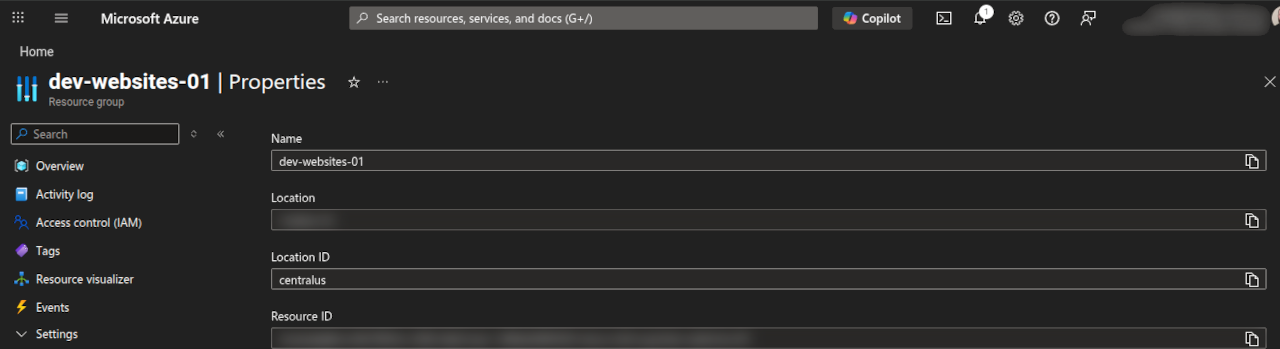
BlurShield - A Chrome Extension for Masking Sensitive Data
Screen sharing, live demos, and recording tutorials are routine activities for developers and IT professionals. However, they come with an inherent risk: accidentally exposing sensitive information like API keys, connection strings, and personal data to an audience. BlurShield is a Chrome extension built to solve this problem by automatically detecting and blurring sensitive content on any web page.
Purpose
The primary purpose of BlurShield is to protect credentials, secrets, and personal information from accidental exposure during screen shares, demos, and recordings. It acts as a safety net by scanning the DOM of every page you visit and applying a CSS blur filter to elements that match known sensitive patterns. This includes cloud provider credentials for Azure, AWS, and GCP, as well as general patterns like email addresses, phone numbers, credit card numbers, and API keys.
BlurShield is a Manifest V3 rewrite and successor to the now-deprecated azure-mask extension, expanding coverage well beyond Azure to support a broad range of cloud providers and general-purpose sensitive data patterns.
TL;DR: BlurShield is a zero-dependency Chrome extension that automatically blurs sensitive data (API keys, GUIDs, emails, credit cards, cloud credentials) on any web page during screen shares and demos. Install it from source or the Chrome Web Store. All processing happens locally - no data ever leaves your browser.
Source Code
BlurShield is open source and available on GitHub: https://github.com/CraigWilsonOZ/BlurShield-CS
Use Cases
BlurShield adds value in several practical scenarios:
- Live Demos and Presentations: Developers and solution architects can confidently navigate cloud consoles (Azure Portal, AWS Console, GCP) during presentations without worrying about exposing subscription IDs, access keys, or connection strings.
- Screen Recording and Tutorials: Content creators recording walkthroughs of cloud services or development tools can avoid the tedious post-production work of manually blurring sensitive fields.
- Pair Programming and Screen Sharing: During collaborative coding sessions, BlurShield ensures that environment variables viewed in web UIs, and API keys in configuration panels remain obscured.
- Compliance and Security Awareness: Organisations can recommend BlurShield as a standard tool for staff who regularly share their screens, reducing the risk of credential leakage in recorded meetings.
Prerequisites
To install and use BlurShield, the following requirements must be met:
- Browser: Google Chrome or any Chromium-based browser (Edge, Brave, etc.) that supports Manifest V3 extensions.
- Installation Method: The extension can be loaded as an unpacked extension for development or installed from the Chrome Web Store for general use.
- No Build Step Required: BlurShield is written in plain JavaScript with no framework dependencies, no bundler, and no npm packages. The source code is the distributable.
How It Works
BlurShield follows a layered architecture that balances performance with comprehensive detection. The extension is designed to be lightweight and non-intrusive, processing everything locally within the browser.
- Service Worker Initialisation: On installation or browser startup, the background service worker sets up default storage values for all configuration options and manages the extension badge state.
- Content Script Injection: A content script is injected into every page at
document_start, ensuring it runs before the page fully renders. It first checks the bypass list - if the current site is bypassed, the script exits immediately with zero overhead. - Pattern Loading: The pattern registry loads all enabled pattern plugins. Each plugin defines its own set of regular expressions and metadata. Built-in plugins cover Azure (GUIDs, SAS tokens, connection strings), AWS (ARNs, access keys), GCP (service accounts), OpenAI and Anthropic API keys, and general patterns (emails, IPs, phone numbers, credit cards).
- DOM Scanning: The content script walks the DOM tree, testing text content against all active patterns. When a match is found, the containing element receives a CSS blur class. Crucially, BlurShield uses CSS blur filters rather than DOM manipulation, which preserves the page structure and avoids breaking JavaScript frameworks like React and Angular.
- Dynamic Content Observation: A
MutationObserverwatches for changes to the DOM, re-scanning new or modified elements. This ensures that dynamically loaded content (SPAs, infinite scroll, AJAX updates) is caught as it appears. - User Controls: The popup UI provides per-site and per-category toggles, allowing users to quickly enable or disable masking. The options page offers full configuration including custom patterns, personal information fields, and the site bypass list.
Architecture
The extension follows a plugin-based pattern architecture:
BlurShield/
├── manifest.json              # Extension configuration (Manifest V3)
├── background/
│   └── service-worker.js      # Storage defaults, badge management
├── content/
│   └── content.js             # Core masking engine, DOM scanning
├── patterns/
│   ├── pattern-registry.js    # Plugin loader and registry
│   ├── azure-patterns.js      # Azure GUIDs, SAS tokens, keys
│   ├── aws-patterns.js        # AWS ARNs, access keys
│   ├── gcp-patterns.js        # GCP service accounts
│   ├── openai-patterns.js     # OpenAI API keys
│   ├── anthropic-patterns.js  # Anthropic API keys
│   ├── general-patterns.js    # Emails, IPs, phones, credit cards
│   └── custom-patterns.js     # User-defined keywords and regex
├── popup/                     # Toolbar popup UI
└── options/                   # Full configuration page
Adding a new pattern provider is straightforward: create a new pattern file following the plugin interface and register it in the manifest. No changes to the core scanning engine are needed.
Security Considerations
- Local Processing Only: All pattern matching and DOM scanning happens entirely within the browser. No data is sent to any external server, API, or telemetry service.
- Storage: Configuration and personal information fields are stored in
chrome.storage.local, which is sandboxed to the extension. Import and export features allow users to back up their configuration. - CSS Blur Approach: By using CSS blur filters rather than removing or replacing text, the original page functionality is preserved. Users can temporarily reveal blurred content when needed without reloading the page.
- Minimal Permissions: The extension requests only the permissions necessary for its operation - access to page content for scanning and storage for configuration.
Limitations
- Browser Specificity: BlurShield is a Chrome (Manifest V3) extension. It is not available for Firefox, Safari, or other non-Chromium browsers without a port to their respective extension APIs.
- Pattern Coverage: While the built-in patterns cover a broad range of common secrets and PII, they cannot catch every possible sensitive string. Users can supplement coverage with custom patterns and keywords.
- Performance on Large Pages: On pages with an extremely large DOM (tens of thousands of elements), the scanning and observation process may introduce minor latency. The bypass list can be used to exclude known-safe sites.
- Image and Canvas Content: BlurShield operates on DOM text content. Sensitive data rendered within images, canvas elements, or embedded PDFs will not be detected or blurred.
Future Work / Enhancement Ideas
- Firefox Support: Port the extension to Firefox using the WebExtensions API for cross-browser compatibility.
- Pattern Sharing: Allow users to export and share custom pattern sets with teams, enabling consistent masking policies across an organisation.
- Enhanced Detection: Investigate using heuristic or entropy-based detection to catch secrets that do not match a fixed regex pattern.
Conclusion
BlurShield provides a practical, lightweight solution to a common problem faced by anyone who shares their screen while working with sensitive systems. By combining a plugin-based pattern architecture with efficient DOM scanning and CSS-based blurring, it delivers broad coverage without impacting page performance or breaking modern web frameworks. The zero-dependency, no-build-step design makes it easy to contribute to and extend, while local-only processing ensures that user data never leaves the browser.
References
For further information on Chrome extension development and the technologies used in BlurShield, consult the following resources.
- BlurShield on Chrome Web Store: Coming soon
- Chrome Extensions Documentation: https://developer.chrome.com/docs/extensions/
- Manifest V3 Migration Guide: https://developer.chrome.com/docs/extensions/develop/migrate
- MutationObserver API: https://developer.mozilla.org/en-US/docs/Web/API/MutationObserver
- Chrome Storage API: https://developer.chrome.com/docs/extensions/reference/api/storage